Week
5/1/2023 Monday
Sick Day.
5/2/2023 Tuesday
- fixed the Grafana graphs.
- Sudhir requested graphs and not tables.
- Set them up as timeseries.
- Made sure that the graphs all work with the dropdowns.
- Sudhir requested graphs and not tables.
- Gateway.
- Setup the Gateway according to Jake's Instructions.
- It kinda worked.
5/3/2023 Wednesday
- Spikes in the graph.
- Where are the spikes coming from. Are they in the data or is it a grafana issue.
- They are in the data the graphs I made in excel are actually worse.
- Sudhir wants to work with Jake on the issue where we are looking at the second Head timestep when we put it into the database.
- Why are the Coordinates in Vannary's inp files change?
- Added more graphs and variables into the Grafana graphs.
- Use the Json Import instead of the copy it is easier to change the data source.
- Look into ModifyGlobalDemandMultiplier how is this different than RMR.
- Where are the spikes coming from. Are they in the data or is it a grafana issue.
5/4/2023 Thursday
- MSX issue
- Benz works with MSX no issues also something I changed made a difference because Benz is now working completely.
- MTW
5/5/2023 Friday
- EPANET is rounding the coordinates when you export an INP file.
- I exported a copy of the Pump Curve INP file from EPANET and named it Mount_Washington_RMX_PumpCurve_test
- The only thing I did was open the Mount_Washington_RMX_PumpCurve file. Run it and then Export the inp file.
- There were changes between the 2 files.
- In the Tanks section, there is a comment that labels the header for each of the column. A column is added for Overflow.
- In the Curves section the additional comments added a PUMP: to the start of the comment. (This looks like it is not a new feature given even our starting file had 2 PUMP: in it.)

- Controls and Rules section added a blank line at the end of the sections.
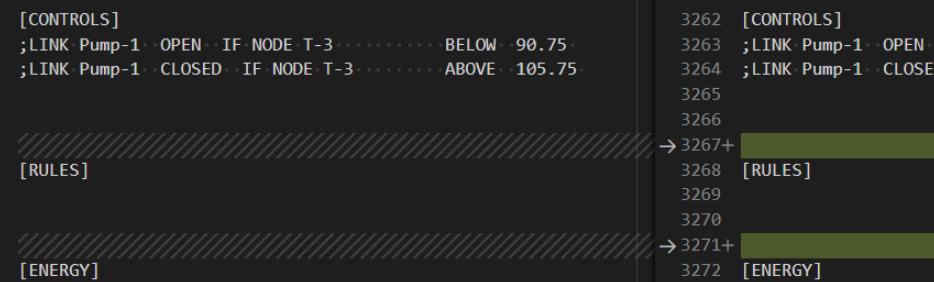
- And the one that we are worried about the coordinates for the Nodes in EPANET are modified.
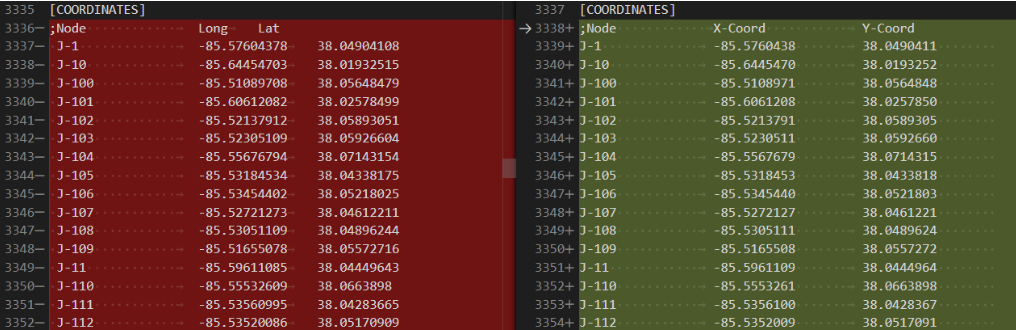
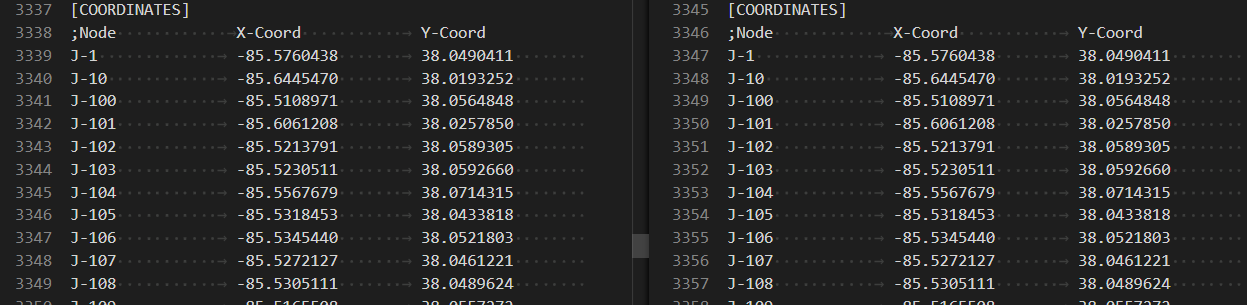
- The coordinates do match between the exported file and what we have in No_Leaks. I checked.
- I exported a copy of the Pump Curve INP file from EPANET and named it Mount_Washington_RMX_PumpCurve_test
- EPANET Not ending causes an infinite Loop.
- This only happens when there are the following events.
- There is no SCADA Data.
- There is an error running during the simulation.
- Why this happens.
- It should be noted that the timeToNextHydraulicEvent variable is very important to the program.
- It controls the Do While loop in Program.cs runs the EPANET simulation. While timeToNextHydraulicEvent is > 0 the program runs.
- The issue is with the RunNextHQ method from EpanetWrapper.CS
- In this method we do the following in this order:
- Run Hydraulics in EPANET
- Run Quality in EPANET
- Get the next Hydraulic Event time in EPANET
- Gent the Next Quality Even time in EPANET
- The issue is that in each of these methods if there is an error (or a warning) we log the error and immediately return false and break out of the method. We are currently throwing a warning at the first step Run Hydraulics in EPANET so we are not hitting the other steps at all. We never change the next time to the NextHydraulicEvent in step 3 so, that variable stays at 141 and we have an infinite loop in Program.cs.
- In this method we do the following in this order:
- The solution is to not return false and break out of the RunNextHQ method.
- It should be noted that the timeToNextHydraulicEvent variable is very important to the program.
- There are still some next steps.
- Get rid of the returns in the 4 sections above.
- instead create a variable error_bool that starts as true. and then is set to false if any of the EPANET results have an error code != 0 then return this variable.That way we would keep the return either true or false.
- Why is having SCADA data effecting the Loop.
- When there is SCADA data the error does seem to appear but it doesn't go into that infinite loop. Therefore having Scada data must be doing something.
- Look at the Global Multiplier does this have an effect?
- I know RMR used to modify the network and have it help match the SCADA Data.
- Global Multiplier was not on during the original testing.
- After using the fix and then the one that was working with SCADA the graphs seem to match.
- Global Multiplier does not seem to be giving as many warnings only 2 during the whole duration. This graph does not match the other graphs.
- Global Multiplier was not on during the original testing.
- I know RMR used to modify the network and have it help match the SCADA Data.
- Get rid of the returns in the 4 sections above.
- This only happens when there are the following events.
TODO
- Get Benz and MTW working on HydroTrek.
- Benz
- Seems to be working completely No issues.
- MTW
- MSX is throwing an error but it is also writing results. ON HOLD
- Bug for simulation not ending. Found and fixed.
- Why was Scada Data working?
- Global Multiplier (This was differently not on Graphs are different)
- Ask Sudhir if he wants any graphs with PDA and Global Multiplier on.
- Ask Sudhir if he cares since we have fixed the error.
- Global Multiplier (This was differently not on Graphs are different)
- Why was Scada Data working?
- Benz
- MTW
- Wrote up a list off the top of my head on things that need to be done before the project can be closed out.
- Talk to Sudhir about pollutant.
- Are we interested in this right now or should we hold off on it for a while. When does he need this out.
- Get the projects running on my machine.
- [ ]
- HydroTrek Documentation
- Organize Documentation From Dropbox.
- Put Documentation on Google Drive.
- Create a document Overview.md for each project in HydroTrek Suite.
- Create documentation for standard inputs and outputs for each network.
- INP Files
- Start and end dates in correct formats
- Where do I need to change the database so that the programs work.
- What type of file is modified to change the configs.
- Update INP Testing files so that we use No_Leaks instead of current standard.
- Keep in mind EPANET issue where they are rounding our coordinates in the INP file.
- Database
- What needs to exist where to find the data for the networks... Everything about the databases. There are 3 per network.
- Create Github issues for each project that reflect the Jira tickets that are available for each project.
- EPANET OWA
- Write up an email on how the OWA changes were made.
- 3 copies clearly labeled of the file where Steve need to verify the modification.
- Make sure no new changes have been made since last week to the OWA code.
- Point Sudhir and Steve to the Latest OWA code.
- Attach the GQC c file to the email. Has the code been back factored into the new OWA code. Will we need to make modifications to our code.
- Send Email to Jake for verification and clarity before I send it off to Steve.
- Run Doxygen on EPANET.
- C code linting look into this.
- Create ERD for Database
- What's the input file you're running that's throwing the imbalance warning? (exact name)
- Can you run the same input file in the 32bit GUI and see if the same imbalance warnings occur?
- Can you look into OWA error codes vs warning codes? Sudhir thinks that "error code 1" doesn't make sense and that maybe <100 are warning codes and >100 are error codes. This would help us with our logging.
- We need to discuss how to handle Warnings vs Errors.
- I need to write up issue I found where error stopped simulation from finishing. (This was warning code. It was pressure related error code 6. The same happened with error code 1. )
- Should be noted that the error code 6 was expected. DDA vs PDA test.
- Write up an email on how the OWA changes were made.
- DDA vs PDA in EPANET
- Export an INP file that uses PDA instead of DDA. Use one of the files that Vannary used last week.
- Find out where we can make the change for that in the INP file.
- 64 DLL redo PDA in console core are we repeating our good results?
- Run With leak for DDA and PDA and Graph in Grafana.
- DDA is done with Global Multiplier as well.
- Export an INP file that uses PDA instead of DDA. Use one of the files that Vannary used last week.
- SWC and SWMM upload to Google drive
- I think this is done but make sure.
- Mark the locations in dropbox when I am done.
- Review SWC Pollutant Functional and Design Specs.
- These are old but we have some experience with SWMMOPT and Chama at this point. So that needs to be leveraged.
- Look into Security for React Frontend. Authentication. SWC
- Chat GPT?